
If you’ve ever sent an invoice and waited weeks for payment, you’re not alone. Many freelancers and small businesses face this issue — not because clients don’t want to pay, but because the invoice itself lacks clarity and professionalism.
A well-designed invoice can make all the difference. It creates trust, speeds up approval, and encourages timely payment. With Grow Invoice, a free online invoice generator, you can design professional, GST-ready invoices that help you get paid faster — every time.
Why Invoice Design Matters
Think of your invoice as part of your brand. A messy or unclear invoice bill format can confuse clients, delay payments, and even make you look unprofessional.
A clear, branded invoice:
✅ Highlights payment terms
✅ Builds credibility
✅ Makes it easy for clients to process payments
✅ Saves time through automation
That’s where tools like Grow Invoice — your online bill generator — come in handy. You can automate invoicing and focus more on your work instead of chasing payments.
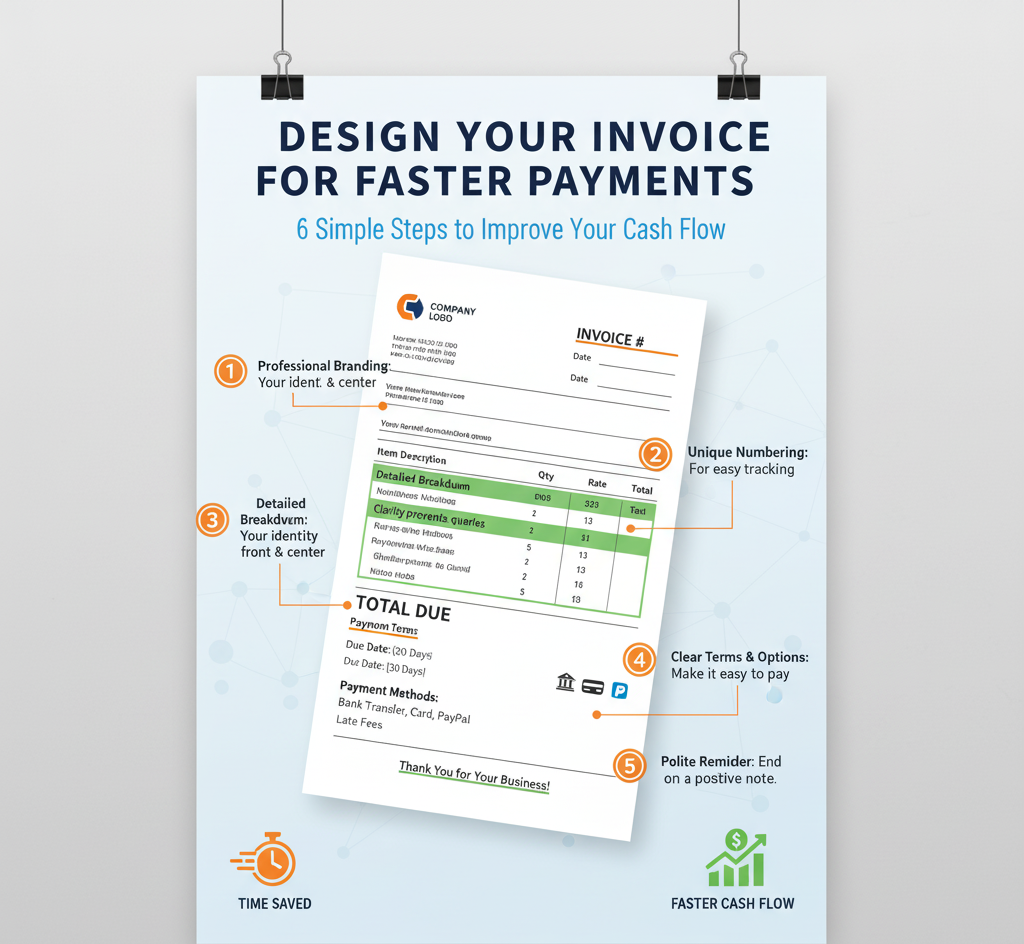
Key Elements of an Invoice That Gets You Paid Faster
Here’s what every fast-paying invoice should include
1. Professional Header & Branding
Include your logo, business name, and contact info. Clients should immediately recognize who the invoice is from. A clean and modern design builds trust.
2. Clear Invoice Details
Your invoice must include:
- Invoice number
- Issue date and due date
- Client name and address
- Payment method and terms
Consistency in your invoice bill format avoids confusion and helps clients make payments quickly.
3. Itemized Service List
List every service or product with quantity, rate, and total. Use clear descriptions — not vague terms. For example, instead of “Work done,” write “Logo design and branding package – 10 hours @ ₹700/hour.”
4. Highlight the Total Amount Due
Make the total amount stand out using bold text or color. It reduces back-and-forth communication and helps clients pay faster.
5. Add Payment Options
Offer flexible payment methods — UPI, bank transfer, credit card, PayPal, etc. Grow Invoice lets you include all payment details directly in your invoice.
6. Include a Friendly Note
End your invoice with a short thank-you or reminder like:
“Thank you for your business! Payment is appreciated within 7 days.”
It’s polite yet effective for timely payments.
How Grow Invoice Helps You Create Faster-Paying Invoices
Instead of creating invoices manually in Excel or using an outdated quotation format in Word, Grow Invoice gives you everything you need in one place:
- Free Online Invoice Generator: Create invoices in seconds — no design skills needed.
- Professional Templates: Choose ready-to-use, GST-compliant designs.
- Automate Invoicing: Set recurring invoices for long-term clients.
- Smart Notifications: Get alerts when invoices are viewed or paid.
- Quotation to Invoice Conversion: Convert approved quotes into invoices instantly.
Grow Invoice makes invoicing simple, automated, and stress-free — so you can get paid faster without chasing clients.
Pro Tips to Speed Up Your Payments
Here are some practical tips to make your invoices even more effective:
- Send invoices immediately after project completion.
- Mention late payment fees (gently!) to motivate quicker payments.
- Keep the invoice bill format consistent — it helps clients recognize your brand.
- Use automation tools like Grow Invoice to schedule recurring invoices.
- Track payments online and send automated reminders instead of manual follow-ups.
Conclusion
Getting paid on time doesn’t just depend on the client — it depends on your invoice design and clarity. A simple, well-formatted, and branded invoice not only makes a strong impression but also helps you get paid faster.
With Grow Invoice, you can create a professional invoice bill format, design invoices from your quotation format, and automate invoicing — all for free.
Start using Grow Invoice today and make your invoicing smarter, faster, and effortless!
What is the Standard Invoice Bill Format for Indian Freelancers?